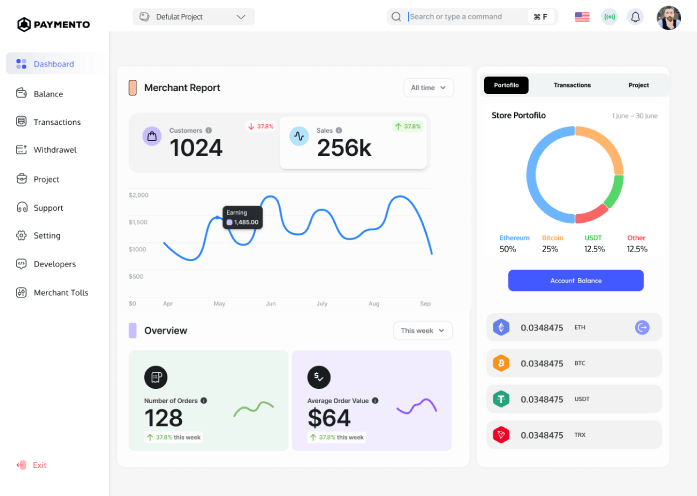
Accept USDT Payments Directly to Your Wallet
Most crypto payment guides were written with Bitcoin in mind. And while Bitcoin still gets the headlines, it’s not what people actually use when they buy things online.
USDT, Tether’s dollar-pegged stablecoin, now accounts for the majority of everyday crypto payment volume. It’s stable, it’s fast, and customers who pay in crypto almost always have it. If you’re setting up crypto payments for your business and you only do one thing right, make sure you’re accepting USDT.
This guide covers everything you need to know: why USDT has become the default currency for online crypto commerce, how the multi-chain reality affects your setup, which chains to prioritize, and how to go live without any technical background.
Why USDT Has Become the Default Currency for Crypto Commerce
Bitcoin’s volatility was always a problem for merchants. A $100 order paid in Bitcoin could be worth $85 by the time you convert it or $120, but that unpredictability is a headache for bookkeeping, pricing, and cash flow. Most merchants don’t want to run a trading operation on the side of their actual business.
USDT solves this. It’s pegged 1:1 to the US dollar, which means a $100 payment is worth $100 when it arrives, $100 a week later, and $100 when you convert it to fiat. No volatility risk. No conversion math. No unpleasant surprises.
For customers, the appeal is similar. They hold USDT in their wallets specifically because it’s stable. It’s the crypto equivalent of digital cash — something they’re comfortable spending without worrying about timing the market.
The result: stablecoins now represent over 70% of all crypto payment transactions globally. USDT alone accounts for more daily transaction volume than Bitcoin and Ethereum combined. If you’re a merchant accepting crypto, your customers almost certainly have USDT. The question is whether you’re making it easy for them to use it.
The Part Most Guides Skip: USDT Runs on Multiple Blockchains
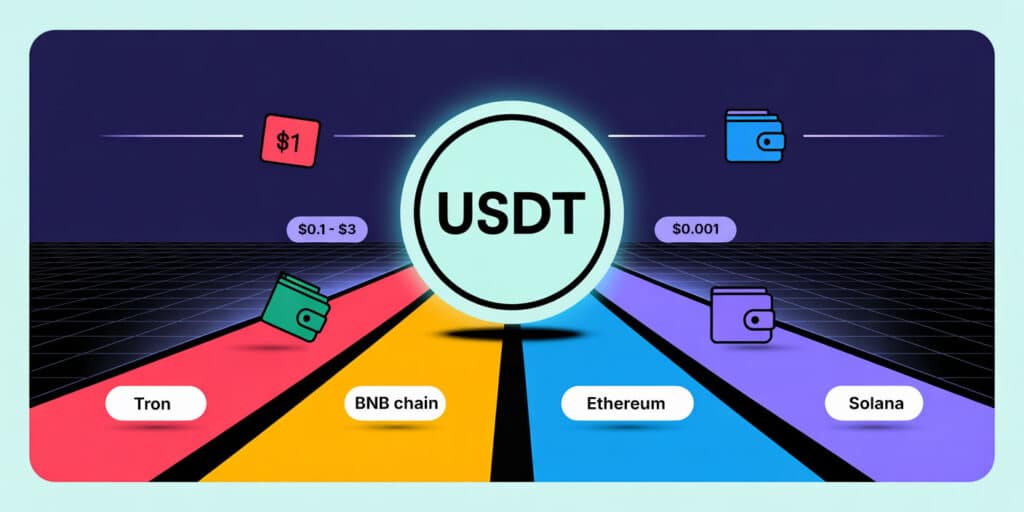
Here’s where most merchant guides fall short: they tell you to “accept USDT” without explaining that USDT isn’t a single-network token. The same dollar-pegged stablecoin exists on multiple blockchains simultaneously and which chain your customer uses affects the fee they pay, how long confirmation takes, and whether the transaction is practical at all.
Think of it like email. The message is the same whether it travels through Gmail or Outlook, but the underlying infrastructure is different. USDT on Tron and USDT on Ethereum are the same dollar value, but they move through completely different networks with completely different fee structures and speeds.
This matters for merchants because if you only configure your gateway to accept USDT on one chain, customers holding USDT on a different chain can’t pay you even though they technically have the money. That’s a lost sale over a pure infrastructure mismatch.
Understanding the chains isn’t optional. It’s the foundation of setting up USDT payments correctly.
USDT on Every Major Chain: Fees, Speed, and When to Use Each
Here’s a breakdown of every major chain where USDT is widely used, what it costs customers to send, and what that means for your merchant setup.
| Chain | Network fee | Confirmation time | Adoption level | Best for |
| Tron (TRC-20) | ~$1 | ~3 minutes | ⭐⭐⭐⭐⭐ Very high | Most merchants, default choice |
| Ethereum (ERC-20) | $3–20+ (variable) | 10–20 minutes | ⭐⭐⭐⭐⭐ Very high | Large transactions ($500+) |
| BNB Chain (BEP-20) | ~$0.20 | ~5 minutes | ⭐⭐⭐ Moderate | Mid-range transactions |
| Solana (SPL) | <$0.01 | <30 seconds | ⭐⭐⭐ Growing fast | Microtransactions, high-frequency |
| Polygon (PoS) | ~$0.01 | ~5 minutes | ⭐⭐⭐ Moderate | Low-value transactions |
Let’s break these down one by one.
Tron (TRC-20) – The Merchant’s Default
TRC-20 is the most popular chain for USDT payments by a significant margin, particularly across Asia, the Middle East, and Eastern Europe. The network fee is roughly $1 regardless of transaction size, confirmation takes about three minutes, and Tron wallets are widely available.
If you had to pick a single chain to support, this is it. The combination of low fees, fast confirmation, and massive user adoption makes TRC-20 the practical default for merchants who accept USDT. Most customers paying in USDT are already holding TRC-20.
Ethereum (ERC-20) – For High-Value Transactions
ERC-20 is the original USDT network and still has very high adoption, but gas fees make it impractical for small purchases. When Ethereum network activity is high, fees can exceed $50 for a single USDT transfer which means a customer paying $30 for a digital product would pay more in fees than the product itself.
For large transactions, consulting payments, wholesale orders, high-ticket digital products, ERC-20 makes sense because the fee is a small percentage of the total. For anything under a few hundred dollars, it’s a poor experience for your customer.
BNB Chain (BEP-20) – Solid Mid-Range Option
BNB Chain fees are low (~$0.20) and confirmations are reasonably fast (~5 minutes). It has a solid user base, particularly among traders and DeFi users who hold assets across Binance’s ecosystem. A good option to include in your multi-chain setup, especially if your customers skew toward active crypto users.
Solana (SPL) – The Fastest and Cheapest Network
Solana is in a different category when it comes to raw performance. Transaction fees are fractions of a cent typically less than $0.01 and confirmations happen in under 30 seconds. For merchants processing a high volume of smaller transactions, or for anyone who wants to give customers the smoothest possible payment experience, Solana’s speed and near-zero cost are genuinely impressive.
Adoption is growing fast. Solana has become one of the most active blockchains for on-chain activity, and the number of users holding USDT (and USDC) on Solana has grown substantially over the past year. Paymento supports Solana natively, meaning you can accept USDT on SPL directly to your wallet alongside all other supported chains. same dashboard, same webhook, same setup process.
Polygon, A Useful Addition
Polygon offers very low fees and decent adoption, particularly among developers and users who interact with Ethereum-adjacent ecosystems. Not a primary chain for most merchants, but worth including if you’re doing a comprehensive multi-chain setup.
Custodial vs. Non-Custodial: Which Type of USDT Gateway Should You Use?
When you accept USDT through a custodial gateway, the payment flow looks like this: your customer sends USDT to the gateway’s wallet, the gateway holds it, and eventually transfers it to you minus their fee and after their settlement window.
This creates a fee problem that most merchants don’t realize until they look closely.
With a custodial gateway, the network fee gets paid twice:
- First by your customer, when they send the payment from their wallet to the gateway
- Then by you (or the gateway, passed on as a withdrawal fee), when the gateway transfers the funds from their wallet to yours
That’s two network transactions for one payment. On Ethereum, that could mean $10–100 in combined fees eaten up just in infrastructure costs, before the gateway’s own percentage fee on top. Even on Tron, where fees are low, the double-fee structure is unnecessary friction.
With a non-custodial gateway, the customer’s payment goes directly to your wallet in a single transaction. There’s no second transfer. No withdrawal fee. No settlement window. The USDT lands in your wallet the moment it’s confirmed on-chain typically within minutes.
For USDT specifically, this distinction is even more important than for volatile assets. The whole point of accepting a stablecoin is predictable, clean settlement. A custodial model with withdrawal delays and double fees undermines that completely. If you’re going to accept USDT, accept it directly.
Paymento’s non-custodial architecture means every USDT payment, across every chain, settles directly to your configured wallet addresses. You set up one wallet address per chain, and every incoming payment arrives there without passing through any intermediary.
How to Set Up USDT Payments with Paymento (Step-by-Step)
Getting from zero to live takes under ten minutes for most merchants. Here’s the process:
Step 1: Create your Paymento account Sign up at paymento.io. No KYC required to get started.
Step 2: Add your wallet addresses In the dashboard, go to add store and enter your USDT wallet address for each chain you want to support. If you want to accept TRC-20, ERC-20, and Solana, you’ll add three addresses, one per chain. Make sure each address is the correct format for that chain (Tron addresses start with T, Ethereum/BNB addresses start with 0x, Solana addresses are base58 encoded).
for accepting bitcoin and UTXO based chain, you can use XPUB-based address generation instead, this generates a fresh unique address for each transaction, which is better for privacy and accounting.
Step 3: Choose your integration method
- Payment links — The simplest option. Generate a link, share it anywhere. Works for freelancers, service businesses, Telegram communities, or anyone without an online store.
- WooCommerce plugin — Install the Paymento plugin from the WordPress repository, connect your account, and USDT appears as a checkout option in your store automatically.
- WHMCS plugin — Same process for hosting businesses and service providers using WHMCS.
- API — For custom integrations, subscription systems, or any platform not covered by existing plugins. Full documentation at paymento.io/docs.
Step 4: Configure which chains customers can pay on In your dashboard, select which USDT networks to enable. Enabling multiple chains is recommended, the checkout will show the customer all available options and let them pick the one that works for their wallet.
Step 5: Test and go live Send a small test transaction from your own wallet on each chain you’ve enabled. Confirm it appears in your dashboard with the correct amount and chain detection. Once verified, you’re live.
USDT Payment Use Cases by Business Type
SaaS and subscription businesses: USDT payments work well for one-time charges and can be configured for recurring billing via Paymento’s payment link system. Customers in regions with limited banking access or currency instability particularly value the ability to pay in a dollar-stable asset.
Digital product sellers: Instant on-chain settlement means product delivery can be automated the moment payment confirms. No waiting on custodial settlement windows before unlocking a download or activating a license.
E-commerce stores: WooCommerce and other platform plugins make USDT acceptance seamless alongside traditional payment methods. Customers see it as a checkout option; you see it as a direct wallet deposit.
Freelancers and service providers: Payment links are the easiest path here. Generate a link for a specific amount, send it to the client, get paid directly to your wallet. No invoicing platform, no bank transfer delays.
Telegram communities and content creators: Paymento’s Telegram integration automates group access based on payment confirmation. A customer pays via USDT payment link, confirms on-chain, and gets added to your premium group automatically — no manual verification needed.
Hosting and infrastructure providers: WHMCS integration makes USDT a native billing option. Customers in regions where credit card billing is difficult — or who simply prefer crypto — can pay invoices in USDT across any supported chain.
What Happens When a Customer Overpays or Underpays?
This is a practical concern that merchants new to crypto payments ask about often.
Underpayment: If a customer sends less than the required amount, usually due to forgetting to account for network fees when they calculated the send amount, Paymento flags the transaction as a partial payment. You can configure your preferred behavior: accept it, reject it, or hold it for manual review. The customer receives a notification about the shortfall.
Overpayment: Less common, but it happens. Paymento records the overpaid amount. Refunding a crypto transaction means sending from your wallet back to the customer’s address, this is a standard crypto transfer, and you control when and whether it happens.
Wrong chain: If a customer sends USDT on a chain you haven’t configured (for example, they send on Arbitrum but you only set up TRC-20 and ERC-20), the gateway won’t detect it. The funds don’t disappear, they’re on-chain and recoverable if you have the right wallet but this is worth flagging in your checkout flow. Showing customers exactly which chains you accept, clearly, prevents most of these cases.
Frequently Asked Questions
Is USDT a good payment method for merchants? Yes, for most merchants. The price stability eliminates volatility risk, adoption is high among crypto users, and the multi-chain options give customers flexibility on fees. The main consideration is that your customers need to already hold crypto, USDT payments don’t work for customers who want to pay with a credit card.
Which USDT chain should I accept? At minimum, TRC-20. It has the highest adoption and the lowest fees for everyday transaction sizes. Adding Solana and BNB Chain covers a wider range of customers. Including ERC-20 is recommended for completeness, especially for customers sending larger amounts. With Paymento, enabling multiple chains takes seconds and has no downside.
Do I need KYC to accept USDT payments? Not with Paymento. There’s no mandatory KYC for merchants to create an account and start accepting payments. Paymento uses a risk-based compliance model. You also don’t need to collect KYC from your customers, email collection is optional, meaning payers can complete a transaction without submitting any personal information if that suits your business model.
Can I accept USDT and convert to fiat automatically? Not within Paymento directly, funds settle to your crypto wallet. Converting to fiat is done separately via a centralized exchange of your choice. This is actually advantageous: you convert on your own schedule at exchange rates, rather than paying a gateway’s often-worse conversion rate at their settlement schedule.
Is accepting USDT legal? In most jurisdictions, yes. Accepting cryptocurrency as payment for goods and services is legal in the vast majority of countries. The legal treatment (tax reporting, accounting) varies by country, so consult with an accountant or legal advisor familiar with crypto in your jurisdiction. As a non-custodial gateway, Paymento doesn’t hold your funds, which simplifies the regulatory picture significantly.
Do I need a separate wallet for each chain? Not necessarily. Many wallets including hardware wallets like Ledger, support multiple chains from a single seed phrase. You’ll have different addresses for each chain, but they can all stem from the same wallet. Paymento lets you configure each chain’s address independently, so your setup is flexible regardless of your wallet structure.
The Bottom Line
USDT is how crypto users pay for things in 2026. The multi-chain reality means getting your setup right matters — accepting only one chain leaves customers on other networks unable to pay you. Supporting TRC-20, Solana, BNB Chain, and ERC-20 covers the vast majority of USDT holders.
The non-custodial model matters here too. When you accept a stablecoin, you want it to arrive cleanly, quickly, and without extra fees eating into the transaction. That means direct settlement — not a custodial provider collecting it, holding it, and charging you to withdraw it.
With Paymento, the entire setup, multi-chain USDT acceptance, direct wallet settlement, plugins or API takes under ten minutes.
Comparing gateways before you commit? Our full best crypto payment gateway guide ranks six gateways on custody model, USDT chain support, fees, and integrations — including a breakdown of which ones genuinely settle direct to your wallet and which don’t.