Crypto Payment Plugins: Add Crypto to the Store You Already Run
If you already sell at volume, the hard part of adding crypto isn’t picking a coin. It’s keeping your order system honest. Every order needs to be marked paid when the money has actually arrived, and only then. A duplicate notification must not turn into a duplicate shipment. A customer who closes the tab halfway through must not leave a “paid” order behind.
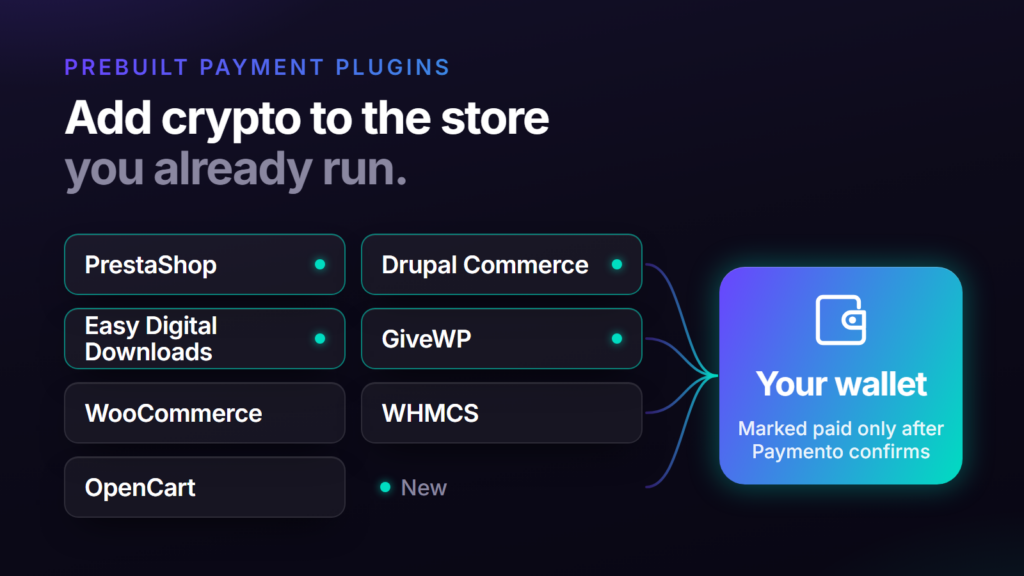
A crypto payment plugin is worth installing only if it gets that right inside the platform you already run. Paymento now has plugins for seven platforms. Four of them are new: PrestaShop, Drupal Commerce, Easy Digital Downloads and GiveWP. This post covers what each one supports, how they handle order state, and where their limits are, so you can decide before you install anything.
Which platforms have a Paymento plugin
| Platform | Built for | Status |
|---|---|---|
| WooCommerce | WordPress stores | Available |
| WHMCS | Hosting providers and billing systems | Available |
| OpenCart | OpenCart stores | Available |
| PrestaShop | PrestaShop 9 stores | New |
| Drupal Commerce | Drupal 11 with Commerce 3 | New |
| Easy Digital Downloads | Digital products on WordPress | New |
| GiveWP | Donation forms on WordPress | New |
Every plugin works the same way at its core. The customer picks crypto at checkout and pays on Paymento’s hosted checkout page. The payment goes straight to your own wallet. Paymento is non-custodial, so it never holds your funds or your keys, and your platform gets the order update once the payment is confirmed on the blockchain.
Running something else? The crypto payment API covers the same flow for custom platforms: your backend creates a payment request, and Paymento sends signed status updates to your callback URL. Shopify, Magento and BigCommerce plugins are in development.
What a crypto payment plugin has to get right at volume
At ten orders a month, you can fix a stuck order by hand. At a few hundred a day, the plugin has to be correct without you. These are the behaviours the new plugins are built around.
An order is marked paid only after Paymento confirms it. When a payment changes state, Paymento sends a signed notification to your site. The plugin checks the signature, then asks Paymento’s verify API directly whether the payment is complete. Only that answer moves the order to paid. The page the customer returns to never marks anything paid on its own, so a customer who lands on your thank-you page before paying doesn’t create a paid order.
Duplicate notifications don’t create duplicate orders. Notifications can arrive more than once. On PrestaShop, the order, invoice and payment record are created only for a confirmed payment, and a repeat notification never creates a second order.
Failed notifications get retried, not lost. If your server can’t process a notification the moment it arrives (Paymento’s API was briefly unreachable, say), the plugin stores it and a scheduled job retries it with increasing delays. That’s why the plugins ask for a cron job that runs every minute. On PrestaShop the job doesn’t poll Paymento. It only retries what your shop already received, and problems show up in a Payment operations table on the module’s settings page.
One store, one callback. Each website uses its own Paymento store, because a store has a single callback address. The plugins refuse to overwrite a callback that another site already uses. If you run several shops, nobody can silently redirect one shop’s payment updates to another.
Your API keys stay out of reach. PrestaShop and GiveWP store your keys encrypted and never show them again after saving. Drupal Commerce keeps them out of the admin screens entirely, in settings.php or environment variables. Easy Digital Downloads can read them from wp-config.php instead of the database.
Refunds keep your order history in sync. Crypto payments can’t be reversed, so a refund is a new on-chain payment that you send. When Paymento records it, PrestaShop sets the order to Refunded and GiveWP sets the donation to Refunded. The plugins don’t send refunds themselves.
The new plugins, platform by platform
PrestaShop
For PrestaShop 9 stores (tested on 9.2 with PHP 8.4). You download the module zip and upload it in the Module Manager, paste your API key and IPN secret, and click Configure callback. Then tick which currencies, countries, carriers and customer groups can pay with crypto.
Know the limits before you install. PrestaShop 8 and earlier aren’t supported, and the payment option is hidden while multistore is enabled. Orders must ship in one shipment. Stock isn’t reserved while a payment confirms, so if an item sells out in that window, no order is created and the payment appears in Payment operations for you to resolve with the customer.
Drupal Commerce
For Drupal 11.4 with Commerce 3.3.13 or later, PHP 8.4 and MySQL or MariaDB. You download the release zip, install it with Drush and add it as a payment gateway under Commerce, Configuration. Built for teams that run Drupal Commerce as a framework, the Commerce Core project way. Credentials live in settings.php, not in the admin UI. Version 1.0 supports non-shippable products only. Commerce Shipping isn’t supported yet, which makes it a fit for digital goods, licences, memberships and services today.
Easy Digital Downloads
For digital product sellers on WordPress 6.7 or newer with EDD 3.x (the free version is enough). Download the plugin zip and upload it under Plugins, Add New. Customers get their downloads once the payment is confirmed on-chain. You set how long a customer has to pay (24 hours by default), and unpaid orders are marked Abandoned an hour after that. Because WordPress only runs scheduled tasks when someone visits, a real cron job is recommended so a quiet site doesn’t hold a paid order until the next visitor.
GiveWP
For nonprofits and creators collecting donations through GiveWP. Download the plugin zip and upload it under Plugins, Add New. Donors pick Crypto by Paymento on the donation form, and the donation moves from Pending to Completed once Paymento confirms the payment. The donor’s receipt goes out then. The background task is required here, not optional: without it, donations can stay Pending after the donor has paid. More on the donation side in how to accept crypto donations.
WooCommerce, WHMCS and OpenCart
These three have been available longer, and install from each platform’s own marketplace: WooCommerce on WordPress.org, WHMCS Marketplace and the OpenCart Marketplace. See WooCommerce crypto payment gateway and WHMCS crypto payment module for setup and what each one covers.
What none of the plugins do yet
Better to know this now than after launch:
- No subscriptions. The plugins take one-time payments. If you bill on a schedule, payment links support recurring billing (daily, weekly, monthly or yearly) with reminder emails and a grace period. See crypto payment links.
- No checkout inside your own page. Every plugin sends the customer to Paymento’s hosted checkout to pay.
- No refunds sent from the plugin. You send the refund and record it in Paymento. The plugin updates the order status.
How to test before going live
Every plugin can be tested end to end with testnet coins before you take a real payment. Paymento supports Bitcoin testnet, Ethereum Sepolia and Tron Shasta. The flow is the same on each platform:
- Enable a testnet asset on your Paymento store and get test funds.
- Place an order on your store and choose crypto at checkout.
- Pay on the hosted checkout page. When you return to your store, the order shows as pending while the blockchain confirms. That’s expected.
- Once confirmed, the order moves to paid (Payment accepted on PrestaShop, Completed on GiveWP).
- Disable the testnet assets before you go live.
Confirmation time depends on the network you’re paid on, so test on the chains your customers actually use.
What it costs
Paymento charges 0.5% per transaction, billed to your Paymento account balance rather than deducted from the payment. You receive the full amount the customer sent, and failed or expired payments aren’t charged. Network fees depend on the chain. Details on fees and pricing.
Who these plugins are for
If you already have a store doing real volume, the plugins let you add crypto at checkout without rebuilding anything. Some typical setups:
- A hosting company billing through WHMCS
- A software or digital product seller on Easy Digital Downloads or WooCommerce
- A shop on PrestaShop or Drupal Commerce that sells internationally
Customers don’t need an account with Paymento to pay. You don’t hand your funds to a processor that can hold them, because there’s nothing to hold: payments go to your own wallet.
That doesn’t change your own obligations. Tax, reporting and the rules where you operate still apply to you, the same as with any payment method. What changes is that settlement is wallet-to-wallet and crypto payments carry no chargebacks.
Get started
- Create a merchant account and a store at app.paymento.io.
- Download the plugin for your platform from the prebuilt payment plugins page and follow its setup guide.
- Run one testnet order, then switch to mainnet.
Want the bigger picture first? Start with accept crypto payments.